

Preview · Live Demo
See Isolate Client in Action
No video, no signup — the real launcher, walk through below
This page is a guided tour of Isolate Client: the same screens you will see after installing. Every feature shown here ships in the current build, and the Download page always serves the latest release straight from GitHub.
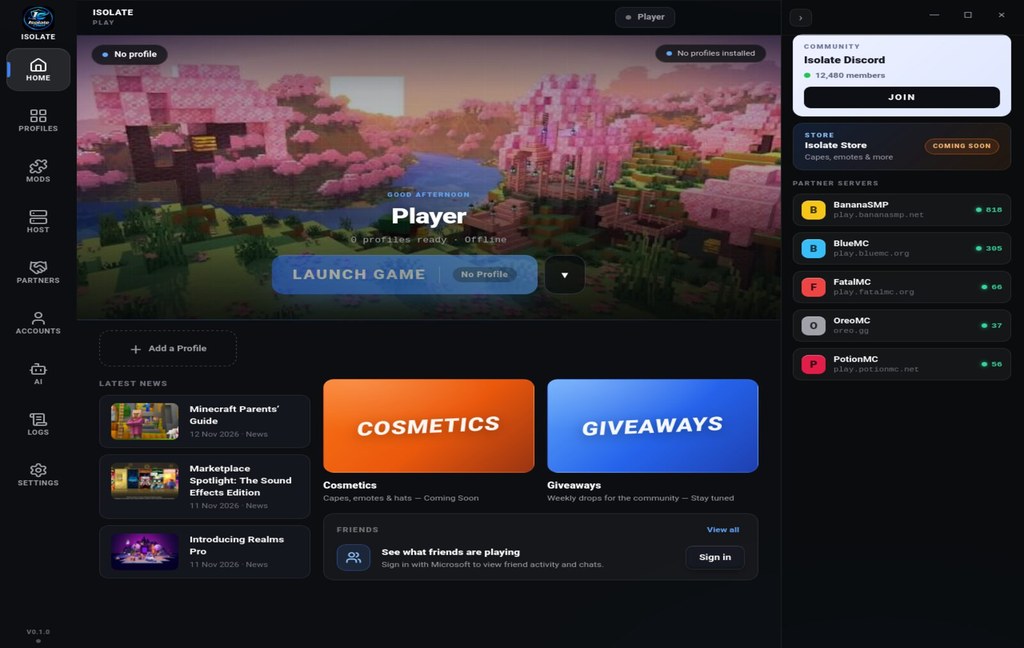
1. The launcher home
One clean screen: your Minecraft username, the version selector, and a single Launch button. The launcher resolves the best Java runtime for your machine automatically — nothing to configure.
2. FPS boost — measured, not promised
Isolate Client ships hand-picked performance mods and an optimized rendering engine. On the reference rig (Intel i7-12700K, RTX 3070, 32GB RAM) the same world that ran at ~1000 FPS on popular launchers ran at 1650 FPS on Isolate Client — over 60% more frames, smoother combat, faster reactions.
3. Free skins & capes
Hundreds of skins and capes are built directly into the launcher. Pick one, click apply, and it is on your character in seconds — no external websites, no account juggling, no cost.
4. Add your own mods in one click
Missing a mod? Drop any Fabric mod straight into the launcher. Isolate Client installs, organizes and toggles it for you, and checks compatibility with your selected Minecraft version automatically.
5. Live downloads & instant updates
The launcher checks for a new build every start and updates itself through the Isolate Client installer — you never download a new version by hand. A toast on the site's download page confirms the moment your download begins.
Ready to try it yourself?
Free forever. No ads, no tracking, no premium tiers.